Iceland Review: Stopping the Bot Attack Behind Weeks of 502 Errors
Weeks of 502 and 504 errors on Iceland Review's WordPress site turned out to be a large-scale bot attack on old, forgotten URLs. I traced it in the server logs, stopped it, and put a layered defense in place so the next one is stopped automatically.
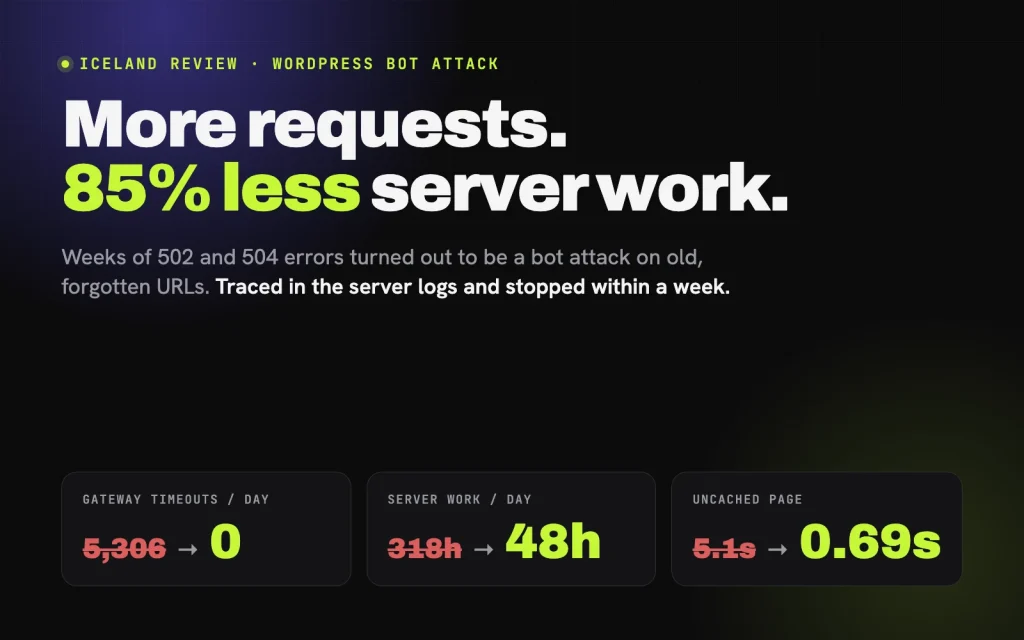
What changed
A full day of server logs from the attack (October 6), compared with a full day a week later (October 12).
Weeks of Errors, and the Wrong Diagnosis
Iceland Review is one of Iceland’s best-known English-language publications, with daily news, culture and travel stories. I’ve looked after the site since rebuilding their editorial platform, so when readers started regularly getting error pages instead of articles, it landed on my desk.
The hosting company’s explanation was that traffic spikes were exceeding the server’s limits. They switched the PHP mode, sent a list of the busiest URLs and user agents, and suggested their premium CDN. Meanwhile their automatic scaling added 7 GB of extra RAM in two days, billed for a month.
Their list pointed at the RSS feed and at Chrome browsers. Both turned out to be red herrings. The feed was already served from cache, and the “Chrome browsers” were scripts pretending to be Chrome.
Reading the logs instead of the summary
I downloaded a full day of raw server logs and analyzed them myself, request by request. Three things stood out:
- Old URLs were eating the server. The site had once had German and other language versions, plus an older website before that. Bots were requesting those long-gone addresses, especially an old German news section, with random parameters attached so that every request missed the cache and forced WordPress to build a full page. These requests alone used about 45% of all server time, at around 11 seconds each.
- One scraper used more than 23,000 IP addresses in a day. It sent over 25,000 page requests, roughly one per IP, all disguised as the same Chrome browser on a Mac. That’s why blocking IPs was hopeless. The tell: only 1% of those IPs ever loaded a stylesheet, script or image. A real browser does that on every page.
- The existing protection wasn’t switched on. The domain was in Cloudflare, with “Under Attack Mode” enabled, but the DNS records were set to “DNS only”, so all traffic bypassed Cloudflare entirely. The caching plugin, NitroPack, had been left in test mode, so visitors weren’t getting optimized pages either.
Google was crawling the same junk: about 361,000 of these old URLs sat in Search Console as “Crawled, not indexed”. In Google Analytics, “Page not found” had become the #1 most-viewed page on the site, at 11.5% of all views, almost entirely bots.
Layer 1: answer old URLs before WordPress wakes up
The site is English-only now, so none of the old addresses needed to work. I added rules to the server configuration that answer every old German, multi-language and old-site URL with “410 Gone” directly from the web server. WordPress never loads, so each request costs a fraction of a millisecond instead of 11 seconds, and Google is told plainly that the pages are permanently removed. The one old link that still mattered, the German subscription page, redirects to the English one.
Layer 2: a custom security plugin, “Traffic Guard”
I built a small WordPress plugin to manage the defenses from the WordPress admin:
- Bot blocking written into the server configuration, so known scrapers are refused before PHP starts. A built-in allow-list means Google, Bing, Apple and social-media crawlers can never be blocked by mistake.
- A 24-hour diagnostics report that samples which visitors and which background requests actually use the server. This is how the later bots in this story were caught early.
- Feed caching and lighter background requests, to trim the remaining load.
- “Cloudflare-only” mode, which refuses any request that didn’t come through Cloudflare, closing the side door for bots that try to skip it. A built-in safeguard means it can’t lock the site out.
Layer 3: Cloudflare, finally in front
With the site switched to Cloudflare’s proxy, attackers are now stopped at Cloudflare’s edge, before they reach the server:
- A repaired blocking rule. The account already had a “Block Bad Bots” rule, but it was disabled and written so it could never match anything. Rewritten, it has blocked over 12,000 requests.
- An automatic challenge for browsers that don’t add up. Every scraper in this attack disguised itself as a browser, and the disguises shared the same tell-tale inconsistencies. Instead of chasing each new disguise, one rule now challenges that whole category. Real people pass without noticing. Bots can’t, and only 0.06% of the 38,000 challenged requests got through.
- Settings that would have broken things. “Under Attack Mode” would have shown every reader a waiting screen, “Bot Fight Mode” would have blocked the caching service and RSS readers, and “Hotlink Protection” was blocking the site’s images in Google Images and news readers. Each was adjusted and tested.
Before switching, I checked SSL on both hostnames and redirects for loops, and tested logins, feeds, ads, the caching service and real visitor IP addresses. A 30-minute monitoring run afterwards showed no errors.
The performance side
Stopping the bots was half the job. The rest made the legitimate traffic cheaper:
- NitroPack taken live and set to work alongside the host’s cache, with article images that load straight away instead of waiting for the reader to scroll.
- Scheduled tasks moved from visitors’ page loads to a real server cron job.
- robots.txt corrected. A Google-specific section had been overriding every crawl rule, so Googlebot was crawling query-string and pagination URLs nobody needed. It now follows the same rules as other crawlers, while keeping access to the CSS and JavaScript Google needs to render pages.
- Ad slots reworked at the publisher’s request: static slots that rotate advertisers by percentage, chosen in the visitor’s browser so page caching doesn’t freeze one ad in place, with no extra server load.
Monitoring caught what testing couldn’t
The first fixes were only the start, and the monitoring paid for itself:
- A crawler found a way around Cloudflare. It’s blocked on the server too now, and it’s what prompted the Cloudflare-only mode.
- The same operator kept changing disguise, which led to the category-wide challenge rule instead of a new block for every new name.
- The site’s view counter had been failing quietly. Two settings in the theme’s view counter were incompatible, so every count crashed. That was only visible in the server logs, and it’s fixed now.
Results
Comparing a full day of server logs from the attack (October 6) with a full day a week later (October 12):
| Metric | Attack day | A week later |
|---|---|---|
| Server work for the day | 318 worker-hours | 48 worker-hours (−85%) |
| Average uncached request | 5.1 s | 0.69 s |
| Requests slower than 5 s | 11,117 | 145 |
| Busiest 10 minutes | ~116 requests at once | ~6 |
| Gateway timeouts (504) | 5,306 | 0 |
| Requests handled | 232,900 | 259,100 |
The site handled more requests with 85% less work. Cached pages now leave the server almost instantly, and “Page not found” has dropped out of Google Analytics’ top pages entirely, so the reports show real readers again.
What I’d tell any publisher
- Read the raw logs. Hosting dashboards summarize, and summaries hide attacks. The answer here was in the details: which URLs, how long each took, and whether the “browser” ever loaded an image.
- Old URLs are an attack surface. Removed language versions and old site sections don’t disappear. Bots and search engines keep asking for them. Answer them cheaply, at the server, before your CMS wakes up.
- Check that protection is actually on. Cloudflare in DNS-only mode, a caching plugin in test mode, a security rule that can’t match: all three looked like protection and weren’t.
- Block categories, not signatures. Attackers rename themselves every few days. Rules that target behavior, such as browsers whose signature doesn’t add up and requests that skip the proxy, keep working when the names change.
More Requests, 85% Less Work
Iceland Review now handles more requests than on the attack day with 85% less server work, the gateway timeouts are gone, and Google Analytics shows real readers again. The next attack meets three layers of defense before it gets anywhere near WordPress.
More work

Heimkoma: Bilingual Static Site Migration
Moved a Reykjavík property company from WordPress, a page builder and machine translation to a bilingual static site that publishes itself in fifteen seconds whenever the client pushes a change.

Rank Analyzer: AI SEO Platform & Chatbot
AI-powered SEO platform with a custom WordPress chatbot that answers plan and pricing questions on its own, escalating only what actually needs a person.

Iceland Review: Editorial Platform Rebuild
Iceland's leading English-language news portal and travel adviser, rebuilt on WordPress with ad revenue treated as a core requirement from day one, not bolted on afterward.