New Life Spaces: Room Visualizer AI Chat Assistant
New Life Spaces is a design-build remodeling company in Upstate New York built around light, nature and craftsmanship, and a lot of their work starts from a gutted basement or a room down to bare studs, not a finished space. The hardest part of selling that kind of project isn’t persuasion, it’s imagination: most homeowners can’t look at exposed joists and a concrete floor and picture a finished room in one of the company’s own design styles. I built Room Visualizer, a custom WordPress plugin, to close that gap directly on their site: a chat assistant that turns a visitor’s own photo into an AI redesign of their room, shown next to a real New Life Spaces project of the same room type, with the conversation ending in a qualified lead in the team’s inbox.
What I built
Room Visualizer is a self-contained WordPress plugin, about 2,450 lines of hand-written PHP, JavaScript and CSS, with its own REST API namespace, its own tabbed settings screen, and its own private lead-storage post type. No page builder, no third-party chatbot embed. A visitor opens the chat, answers a few questions, uploads a photo of their room, gutted, mid-remodel or already finished, picks one of four design styles, and within about a minute sees an AI redesign of their own room, next to a real New Life Spaces before-and-after of the same kind of room.

Prompting for a real remodel, not a showroom render
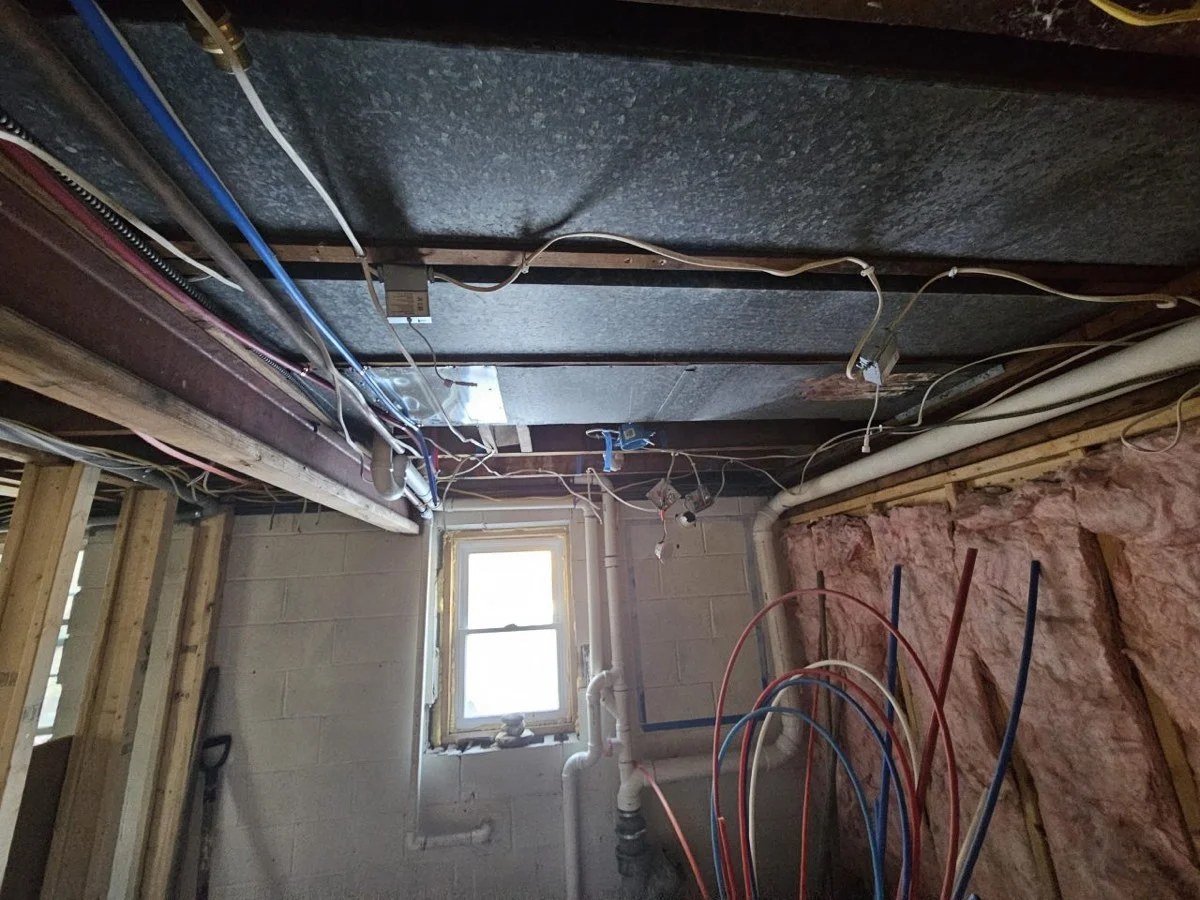
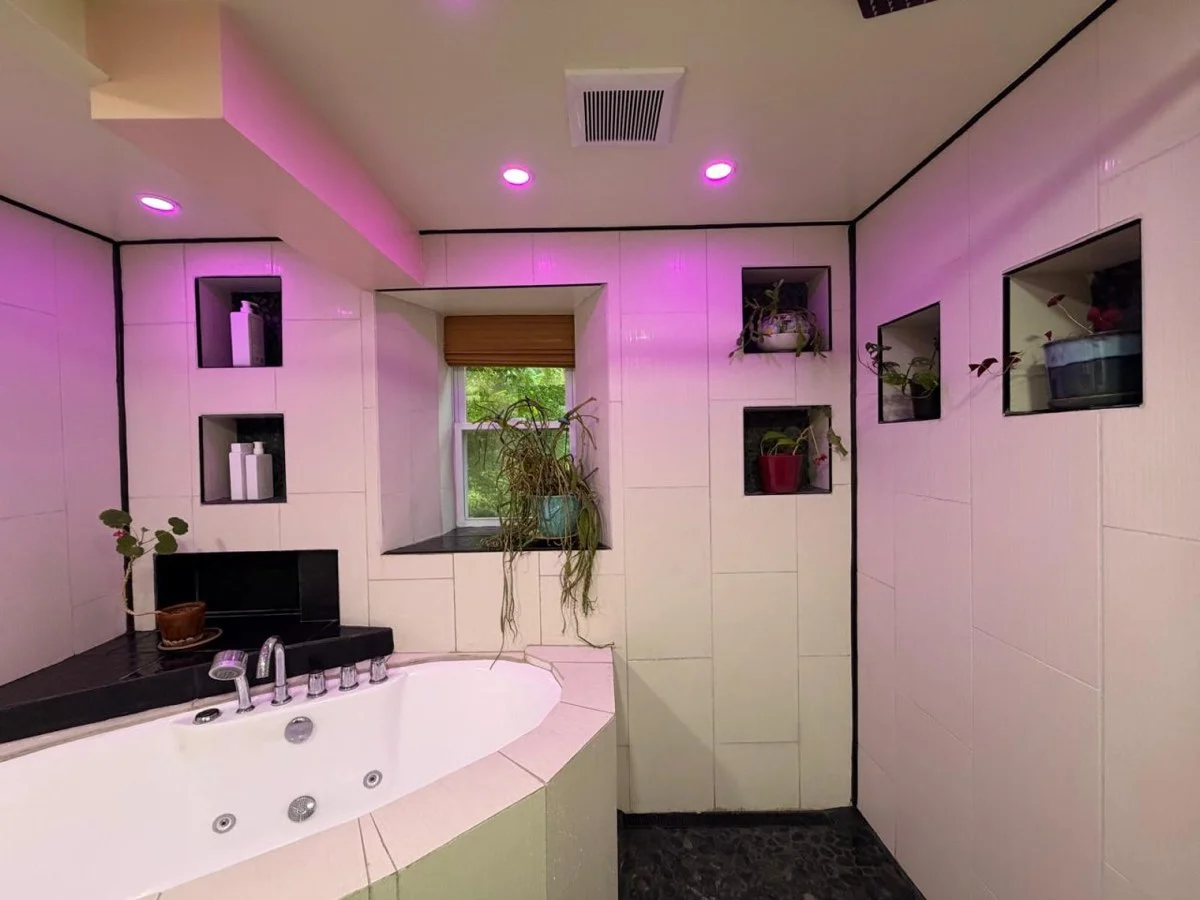
Calling OpenAI’s image-edit endpoint was the easy part. Making the result look like a job New Life Spaces would actually build was the real work. Each of the four styles on offer, Japandi, Biophilic, Nordic Simplicity and Living Materials, carries its own prompt written around the specific materials the company builds with: solid oak and hickory floors, butcher-block counters, live-edge shelving, matte black fixtures, shoji-style sliding screens, not just a style name handed to the model. And because most of the photos this widget actually receives are from a construction site rather than a finished room, every room type also carries its own “what finished looks like” checklist. For a bathroom, that means a vanity, a toilet, and a shower or tub placed where the existing plumbing already is. The prompt tells the model exactly what “done” means for that specific room before it ever touches the photo, and handles the opposite case too: if the room is already finished, it restyles the finishes and furnishings instead of trying to rebuild a room that doesn’t need it.
Built so it can’t run away with the client’s OpenAI bill
Every AI design costs New Life Spaces real money, so the plugin treats every anonymous visitor as a potential script until proven otherwise. A signed session token, tied to the visitor’s IP and issued when the chat opens, has to be presented with every request and is refused if it’s used too quickly after the chat opened or too long after it expires. A honeypot field catches simple bots outright. Uploaded photos are checked by their actual bytes, not their declared file type, and capped at 8MB. Each visitor gets one free AI design, tracked by IP and by email so switching one doesn’t reset the other, and that allowance is claimed before the paid call goes out and only released if the call fails, so two requests in parallel can’t both slip through. A site-wide daily cap on paid renders sits underneath all of it as a hard stop on cost.
Real work, always on screen, even when the AI isn’t
If OpenAI is slow, over quota, or simply not connected yet, the widget never shows an error. It falls back to a client-side color preview, generated instantly in the browser from the same palette each style already defines, so a visitor always sees something happen. The AI result and the real project photo are both shown in the same drag-to-compare slider, not a static side-by-side, so comparing “your room” to “our work” feels the same either way.
Everything editable without touching code
The team runs this from an ordinary WordPress admin screen: six tabs covering general visibility, the OpenAI connection (with a free “test connection” check that verifies the API key without generating an image), the chatbot’s wording and colors, the four design styles, the five rooms and their example photos, and lead handling. Each tab saves independently, so editing the welcome message can’t accidentally blank the API key. Every lead lands in a private post type only administrators can see, with the room, style and note laid out in a table and an email sent straight to the team with Reply-To set to the visitor’s own address.
Where it stands
Room Visualizer is live in Live mode, real AI designs, real cost per render, on New Life Spaces’ Design Philosophy pages, the pages a visitor is already on when they’re picturing a style for their own home. It’s a deliberate, scoped rollout rather than a site-wide flip: the plugin’s per-page targeting keeps it off the rest of the site for now, so the team can watch real designs and real leads come in from its best-fit pages before switching it on everywhere.
Rank Analyzer: AI SEO Platform & Chatbot
Rank Analyzer is an AI-powered SEO and content analysis tool I built and run myself, aimed at marketers and SEO teams navigating the shift to generative search: Google’s AI Overviews, ChatGPT search, and the other AI answer engines that now sit between a search and a click. It needed a marketing site that could explain a genuinely technical product in plain language, and a way to answer the questions every visitor asks (what’s included, what does it cost, how is this different from a normal audit) without me answering each one by hand.
What I built
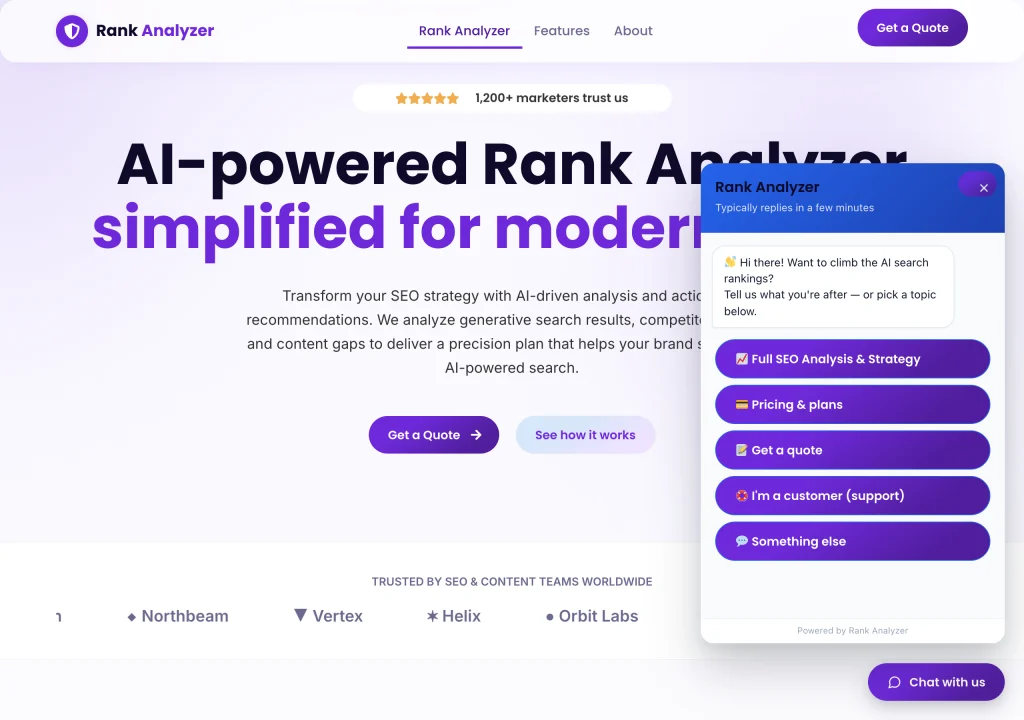
The site itself runs on WordPress and Elementor. Behind the chat bubble in the corner is a custom WordPress plugin I wrote rather than a third-party embed, a guided assistant that actually knows the product’s plans and pricing instead of deflecting to a contact form.
The homepage sets out the product in three parts: live research across major AI search engines compiled into a dataset-type scoring table, a content recipe (headings, proportions, schema markup) built to match what those engines reward, and an eight-week cluster plan with multimedia ideas to build topical authority beyond a single article.
The chatbot
It knows the actual pricing, not just “get in touch”
Asking the bot about the flagship offer doesn’t route to a contact form. It names the plan, the price, and exactly what’s included: a comprehensive report, on-page and technical audit, dataset scoring with competitor insights, and keyword-gap opportunities. Most chat widgets bolted onto a marketing site can’t do this, because they’re not actually wired to the product.
Knowing when to stop guessing
I tested it with an open-ended question it hadn’t been given a script for (how this compares to a normal SEO audit tool). Instead of improvising an answer it couldn’t stand behind, it acknowledged the question and pivoted into collecting a name and contact details for a real follow-up. A wrong guess from a chatbot costs more trust than an honest handoff, so the bot is built to know the difference between a question it can answer on the spot and one that needs a person.
Testing
I test the chatbot the same way a real visitor would: working through each quick-reply path (SEO analysis and strategy, pricing and plans, getting a quote, existing-customer support) and then trying to break it with questions outside the script, checking that it either answers correctly or hands off cleanly rather than inventing something.
Sacks.ie: Eircode Checkout Autofill
Sacks.ie’s WooCommerce checkout asked customers to type a full Irish address by hand, a process prone to typos and inconsistent formatting that led to failed and misrouted deliveries. We built a custom plugin that adds a dedicated Eircode field to checkout, wired to the Woosmap Localities API. As a customer types their Eircode, the plugin looks up matching addresses and auto-fills the street, town and county in one step.
The integration was built cost-aware, querying the API only from the Eircode field rather than on every keystroke across the form, so usage (and cost) stays proportional to actual checkout volume.
Iceland Now: AI News Publisher
IcelandNow.org needed a steady stream of Iceland-focused travel and news content without a full editorial team behind it. We built a self-contained WordPress plugin that handles the entire pipeline. It pulls from configured RSS feeds and scraped Icelandic news listings, maintains a demand-ranked queue of evergreen travel topics, and runs a trend-detection engine that catches breaking stories (like a pilot strike) while they’re still hot.
Claude writes every draft in a journalist or travel-writer voice. An Iceland-relevance filter runs at both fetch and generation time to keep foreign and hyperlocal-only stories out, and images are sourced in parallel from Flickr and Unsplash, scored and matched, with a 500-photo memory so nothing repeats. Every draft is scored against a quality gate before it’s even illustrated; anything below the bar is skipped rather than published.
What passes gets Yoast SEO meta, schema.org markup, and up to four internal links into existing posts, then lands in an admin dashboard for a final human review before it goes live. Alongside the automated batches, a “Write an Article” tool lets the team generate a single on-demand piece from just a topic (and optionally a source URL to ground it in), with a length dial running from a tight 450 to 700 word rewrite up to a 1,300 to 1,800 word in-depth guide, saved as a draft or published immediately.