Iceland Review: Stopping the Bot Attack Behind Weeks of 502 Errors
Iceland Review is one of Iceland’s best-known English-language publications, with daily news, culture and travel stories. I’ve looked after the site since rebuilding their editorial platform, so when readers started regularly getting error pages instead of articles, it landed on my desk.
The hosting company’s explanation was that traffic spikes were exceeding the server’s limits. They switched the PHP mode, sent a list of the busiest URLs and user agents, and suggested their premium CDN. Meanwhile their automatic scaling added 7 GB of extra RAM in two days, billed for a month.
Their list pointed at the RSS feed and at Chrome browsers. Both turned out to be red herrings. The feed was already served from cache, and the “Chrome browsers” were scripts pretending to be Chrome.
Reading the logs instead of the summary
I downloaded a full day of raw server logs and analyzed them myself, request by request. Three things stood out:
- Old URLs were eating the server. The site had once had German and other language versions, plus an older website before that. Bots were requesting those long-gone addresses, especially an old German news section, with random parameters attached so that every request missed the cache and forced WordPress to build a full page. These requests alone used about 45% of all server time, at around 11 seconds each.
- One scraper used more than 23,000 IP addresses in a day. It sent over 25,000 page requests, roughly one per IP, all disguised as the same Chrome browser on a Mac. That’s why blocking IPs was hopeless. The tell: only 1% of those IPs ever loaded a stylesheet, script or image. A real browser does that on every page.
- The existing protection wasn’t switched on. The domain was in Cloudflare, with “Under Attack Mode” enabled, but the DNS records were set to “DNS only”, so all traffic bypassed Cloudflare entirely. The caching plugin, NitroPack, had been left in test mode, so visitors weren’t getting optimized pages either.
Google was crawling the same junk: about 361,000 of these old URLs sat in Search Console as “Crawled, not indexed”. In Google Analytics, “Page not found” had become the #1 most-viewed page on the site, at 11.5% of all views, almost entirely bots.
Layer 1: answer old URLs before WordPress wakes up
The site is English-only now, so none of the old addresses needed to work. I added rules to the server configuration that answer every old German, multi-language and old-site URL with “410 Gone” directly from the web server. WordPress never loads, so each request costs a fraction of a millisecond instead of 11 seconds, and Google is told plainly that the pages are permanently removed. The one old link that still mattered, the German subscription page, redirects to the English one.
Layer 2: a custom security plugin, “Traffic Guard”
I built a small WordPress plugin to manage the defenses from the WordPress admin:
- Bot blocking written into the server configuration, so known scrapers are refused before PHP starts. A built-in allow-list means Google, Bing, Apple and social-media crawlers can never be blocked by mistake.
- A 24-hour diagnostics report that samples which visitors and which background requests actually use the server. This is how the later bots in this story were caught early.
- Feed caching and lighter background requests, to trim the remaining load.
- “Cloudflare-only” mode, which refuses any request that didn’t come through Cloudflare, closing the side door for bots that try to skip it. A built-in safeguard means it can’t lock the site out.
Layer 3: Cloudflare, finally in front
With the site switched to Cloudflare’s proxy, attackers are now stopped at Cloudflare’s edge, before they reach the server:
- A repaired blocking rule. The account already had a “Block Bad Bots” rule, but it was disabled and written so it could never match anything. Rewritten, it has blocked over 12,000 requests.
- An automatic challenge for browsers that don’t add up. Every scraper in this attack disguised itself as a browser, and the disguises shared the same tell-tale inconsistencies. Instead of chasing each new disguise, one rule now challenges that whole category. Real people pass without noticing. Bots can’t, and only 0.06% of the 38,000 challenged requests got through.
- Settings that would have broken things. “Under Attack Mode” would have shown every reader a waiting screen, “Bot Fight Mode” would have blocked the caching service and RSS readers, and “Hotlink Protection” was blocking the site’s images in Google Images and news readers. Each was adjusted and tested.
Before switching, I checked SSL on both hostnames and redirects for loops, and tested logins, feeds, ads, the caching service and real visitor IP addresses. A 30-minute monitoring run afterwards showed no errors.
The performance side
Stopping the bots was half the job. The rest made the legitimate traffic cheaper:
- NitroPack taken live and set to work alongside the host’s cache, with article images that load straight away instead of waiting for the reader to scroll.
- Scheduled tasks moved from visitors’ page loads to a real server cron job.
- robots.txt corrected. A Google-specific section had been overriding every crawl rule, so Googlebot was crawling query-string and pagination URLs nobody needed. It now follows the same rules as other crawlers, while keeping access to the CSS and JavaScript Google needs to render pages.
- Ad slots reworked at the publisher’s request: static slots that rotate advertisers by percentage, chosen in the visitor’s browser so page caching doesn’t freeze one ad in place, with no extra server load.
Monitoring caught what testing couldn’t
The first fixes were only the start, and the monitoring paid for itself:
- A crawler found a way around Cloudflare. It’s blocked on the server too now, and it’s what prompted the Cloudflare-only mode.
- The same operator kept changing disguise, which led to the category-wide challenge rule instead of a new block for every new name.
- The site’s view counter had been failing quietly. Two settings in the theme’s view counter were incompatible, so every count crashed. That was only visible in the server logs, and it’s fixed now.
Results
Comparing a full day of server logs from the attack (October 6) with a full day a week later (October 12):
| Metric | Attack day | A week later |
|---|---|---|
| Server work for the day | 318 worker-hours | 48 worker-hours (−85%) |
| Average uncached request | 5.1 s | 0.69 s |
| Requests slower than 5 s | 11,117 | 145 |
| Busiest 10 minutes | ~116 requests at once | ~6 |
| Gateway timeouts (504) | 5,306 | 0 |
| Requests handled | 232,900 | 259,100 |
The site handled more requests with 85% less work. Cached pages now leave the server almost instantly, and “Page not found” has dropped out of Google Analytics’ top pages entirely, so the reports show real readers again.
What I’d tell any publisher
- Read the raw logs. Hosting dashboards summarize, and summaries hide attacks. The answer here was in the details: which URLs, how long each took, and whether the “browser” ever loaded an image.
- Old URLs are an attack surface. Removed language versions and old site sections don’t disappear. Bots and search engines keep asking for them. Answer them cheaply, at the server, before your CMS wakes up.
- Check that protection is actually on. Cloudflare in DNS-only mode, a caching plugin in test mode, a security rule that can’t match: all three looked like protection and weren’t.
- Block categories, not signatures. Attackers rename themselves every few days. Rules that target behavior, such as browsers whose signature doesn’t add up and requests that skip the proxy, keep working when the names change.
Heimkoma: Bilingual Static Site Migration
Heimkoma sells fractional ownership of Icelandic homes: a Reykjavík apartment, a holiday home, or a share in three properties. Its website ran on WordPress with a page builder, and every English page was generated at request time by a translation plugin, so none of the English existed as a real page Google could index properly. Content changes meant opening the builder, and anything structural meant a developer.
Two pages had already moved off that model: a Reykjavík landing page and a press page, both published from GitHub, and both working well. The job was to bring the whole site onto the same footing without breaking the parts that already ran independently.
What I built
A full migration from WordPress to a bilingual static site, with deployment and measurement built around it:
- A bilingual static site with 82 pages live, including 41 authored English pages paired to their Icelandic originals in place of machine translation
- Push-to-publish deployment: the client edits content as files in the repository, and a commit publishes the site with automated checks
- One deployment model covering the main site, the Reykjavík page and the press page, replacing four separate arrangements
- Consent-gated embeds for 3D tours, maps and video, with a notice in the visitor’s own language when consent is declined
- Conversion tracking for enquiries, calendar bookings, phone and email clicks, each wired as a distinct event and verified firing on the live site
The interesting problems
Most of the risk in a migration isn’t building the new site. It’s the old site’s hidden behaviour that only shows up when something stops serving it.
The whole cutover turned on one line
The server had no DirectoryIndex set, so WordPress’s index.php won at every directory root, and any static index.html placed alongside it was simply never served. Adding DirectoryIndex index.html index.php switched the site over, and removing it switched it back. Because copying the new files onto the server changed nothing on its own, everything could be staged and inspected in place before going live, and rollback was a thirty-second operation rather than a restore.
Two traps that only showed up in testing
Deactivating the translation plugin didn’t remove its rewrite rules, so the English site would have stayed dead behind them. And one redirect existed only inside a WordPress plugin, in no repository file; it would have started returning errors the moment WordPress stopped serving pages. Neither was visible from reading the code. Both were found by testing, and fixed before the switch.
A privacy defect found by testing the refusal
The property pages embed 3D tours, maps and video. Checking the cookie banner with consent actively declined showed those embeds loading anyway, contacting third parties for a visitor who had said no. The fix moved each embed behind the consent layer already on the site and added a short notice in the visitor’s language, so a declining visitor sees an explanation rather than an empty rectangle. Eighteen embeds across ten pages were tested in both states before the change went near the live site.
Measurement that counts things that happened
Analytics was deliberately left switched off through launch, so data collection would begin only once events were confirmed to be arriving correctly. Wiring the events surfaced two existing problems: a conversion that counted page views of a thank-you page rather than confirmed bookings, and an automatic form-capture setting that would have recorded every enquiry twice once tracking went on. Both were reported before they could contaminate a single figure.
A deploy built so a bad day stays small
Automation that can reach everything is a liability, so the deploy was designed around what it must never be able to touch. When the client pushes a change, this runs without anyone watching:
- Refuse a draft build. A draft carries no sitemap and a no-index flag, and publishing one would remove the site from Google, so the deploy stops instead.
- Upload to a staging directory over SSH, using a write-only key that has no shell access and cannot read anything back.
- Publish directory by directory, so deletions stay inside folders the site owns. WordPress, the uploaded media, the guest handbooks and the cleaning checklist are unreachable by a deploy, even after a mistaken commit.
- Smoke-test the live site by requesting key pages and a redirect, so a failure surfaces in the deploy log rather than in someone’s browser a week later.
- Report a green tick, or a named failure with the step that caused it.
Before the switch, a full backup of files, database and server configuration was restored in rehearsal rather than trusted on faith. The routing file the entire site depends on now lives in version control, not only on the server.
Testing
A migration is judged by what survives it. Every address the previous site published was requested against the new one and accounted for, including media files and Icelandic property pages such as /sameign-i-husafelli/ and /haldid-og-sleppt/. That meant 37 legacy addresses reconciled with none broken, 24 redirects configured (including the one found only inside WordPress), 102 retired machine-translation prefixes sent somewhere useful, and 53 post-launch checks, all passing.
WordPress stays installed and running quietly, because the cleaning-checklist form still posts to it. It no longer serves a single public page.
Rank Analyzer: AI SEO Platform & Chatbot
Rank Analyzer is an AI-powered SEO and content analysis tool I built and run myself, aimed at marketers and SEO teams navigating the shift to generative search: Google’s AI Overviews, ChatGPT search, and the other AI answer engines that now sit between a search and a click. It needed a marketing site that could explain a genuinely technical product in plain language, and a way to answer the questions every visitor asks (what’s included, what does it cost, how is this different from a normal audit) without me answering each one by hand.
What I built
The site itself runs on WordPress and Elementor. Behind the chat bubble in the corner is a custom WordPress plugin I wrote rather than a third-party embed, a guided assistant that actually knows the product’s plans and pricing instead of deflecting to a contact form.
The homepage sets out the product in three parts: live research across major AI search engines compiled into a dataset-type scoring table, a content recipe (headings, proportions, schema markup) built to match what those engines reward, and an eight-week cluster plan with multimedia ideas to build topical authority beyond a single article.
The chatbot
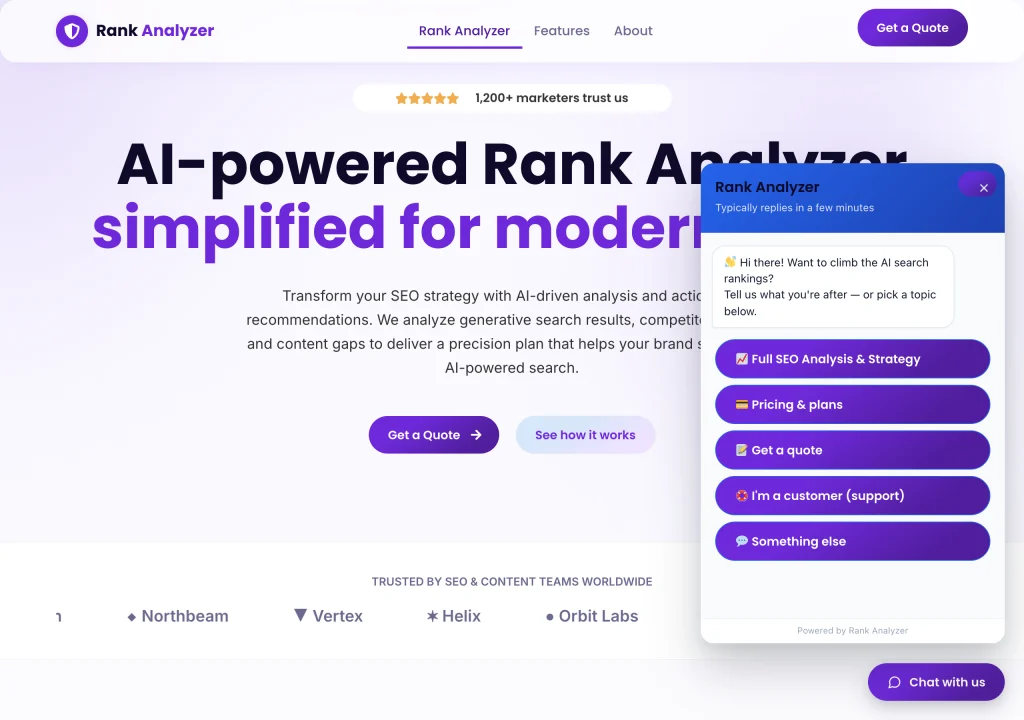
It knows the actual pricing, not just “get in touch”
Asking the bot about the flagship offer doesn’t route to a contact form. It names the plan, the price, and exactly what’s included: a comprehensive report, on-page and technical audit, dataset scoring with competitor insights, and keyword-gap opportunities. Most chat widgets bolted onto a marketing site can’t do this, because they’re not actually wired to the product.
Knowing when to stop guessing
I tested it with an open-ended question it hadn’t been given a script for (how this compares to a normal SEO audit tool). Instead of improvising an answer it couldn’t stand behind, it acknowledged the question and pivoted into collecting a name and contact details for a real follow-up. A wrong guess from a chatbot costs more trust than an honest handoff, so the bot is built to know the difference between a question it can answer on the spot and one that needs a person.
Testing
I test the chatbot the same way a real visitor would: working through each quick-reply path (SEO analysis and strategy, pricing and plans, getting a quote, existing-customer support) and then trying to break it with questions outside the script, checking that it either answers correctly or hands off cleanly rather than inventing something.
Iceland Review: Editorial Platform Rebuild
Iceland Review is Iceland’s leading English-language news portal and travel adviser. It’s part daily news for readers following the country, part travel guidance for visitors planning a trip. Almost all of its income comes from display advertising, so this rebuild couldn’t treat ad placements as an afterthought. They needed to be part of the layout from day one.
We rebuilt the platform on a custom WordPress theme with Advanced Ads managing every placement: banner units the editorial team can position and swap without touching a line of template code, sized to stay visible and viewable (which is what actually drives ad revenue) without slowing the site down or burying the articles underneath them.
Around that ad infrastructure, we restructured navigation for the site’s two real audiences: News for readers following Iceland day to day, and Travel for visitors planning ahead. We also cleared years of accumulated technical SEO debt and set up an ongoing webmaster relationship that’s still running today.
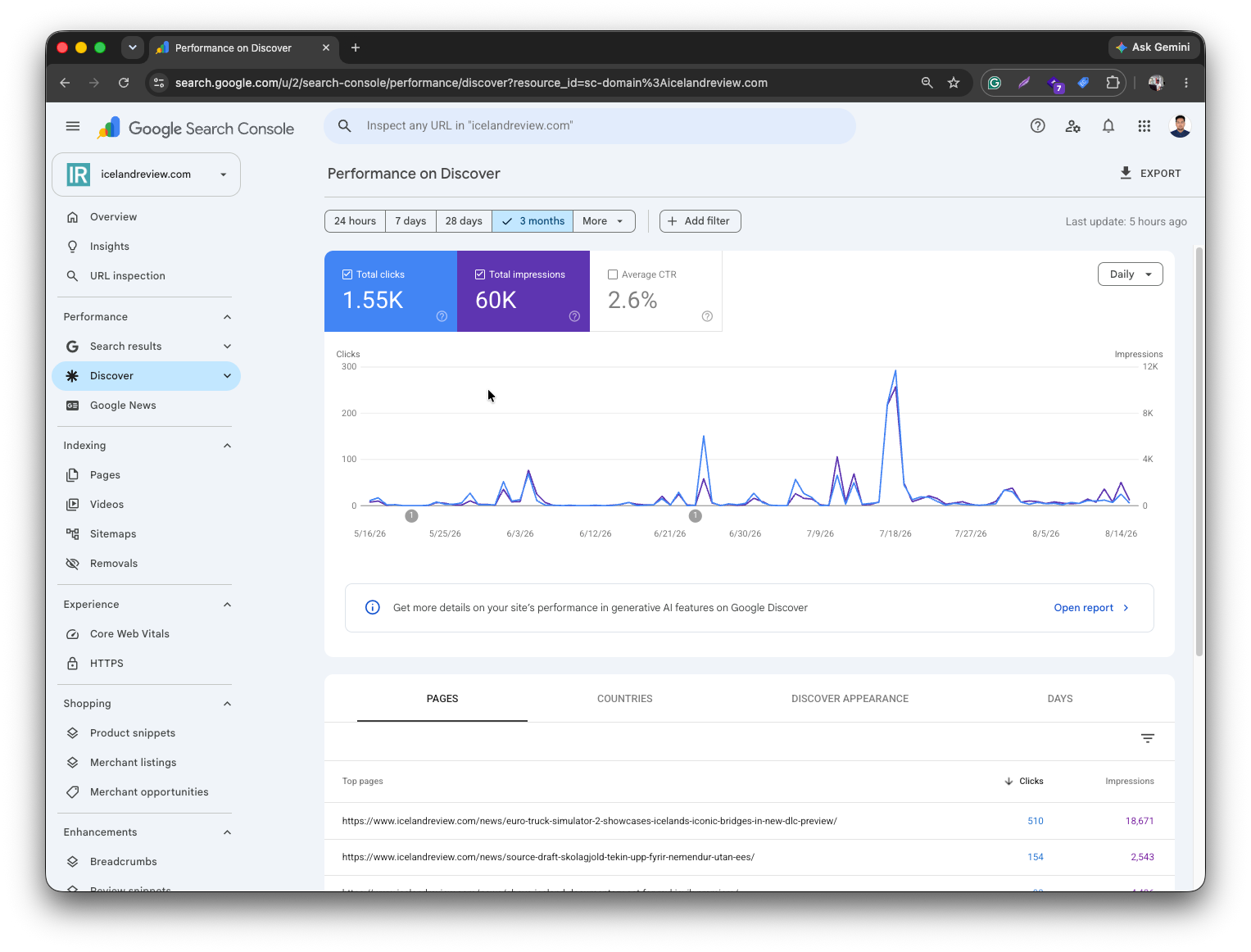
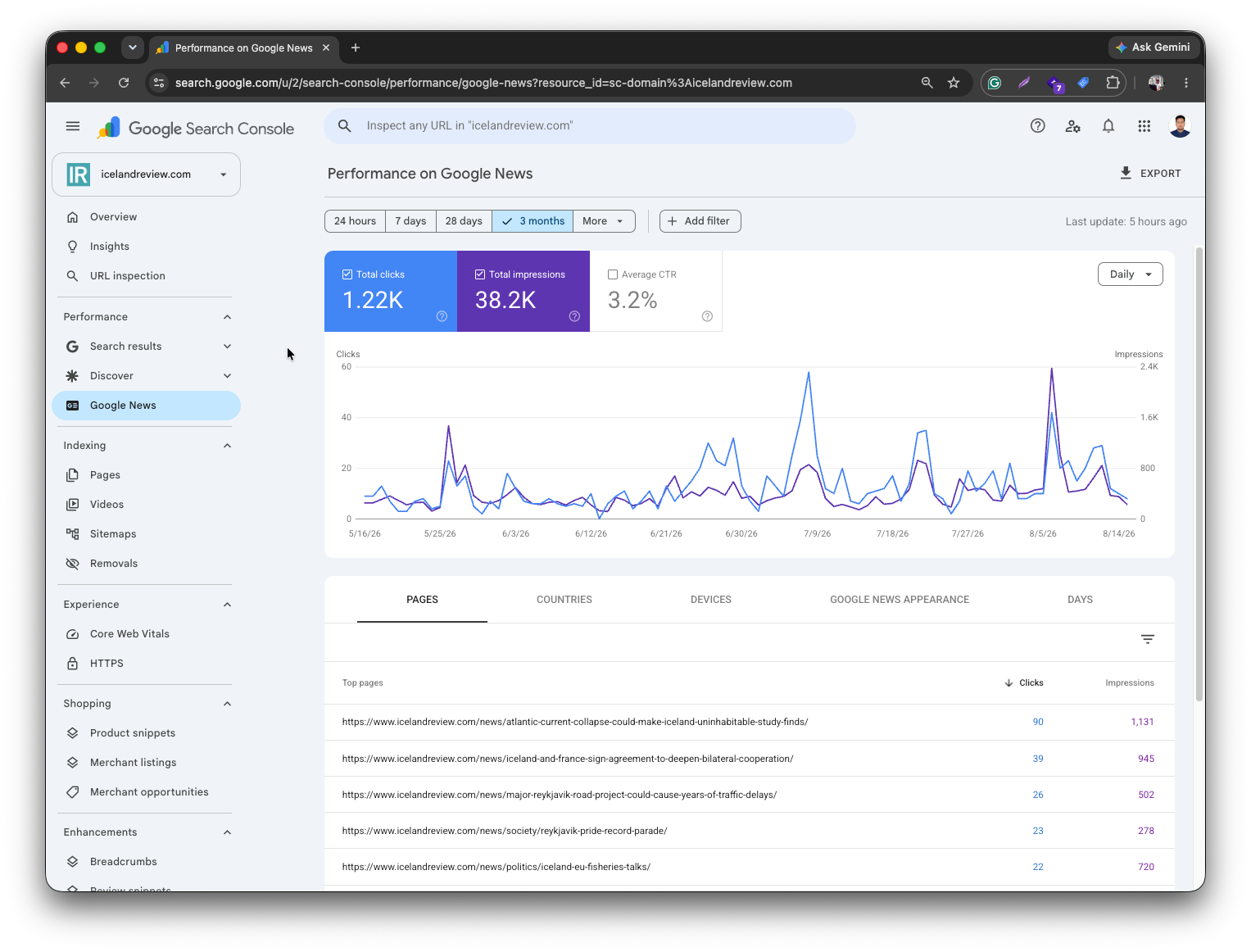
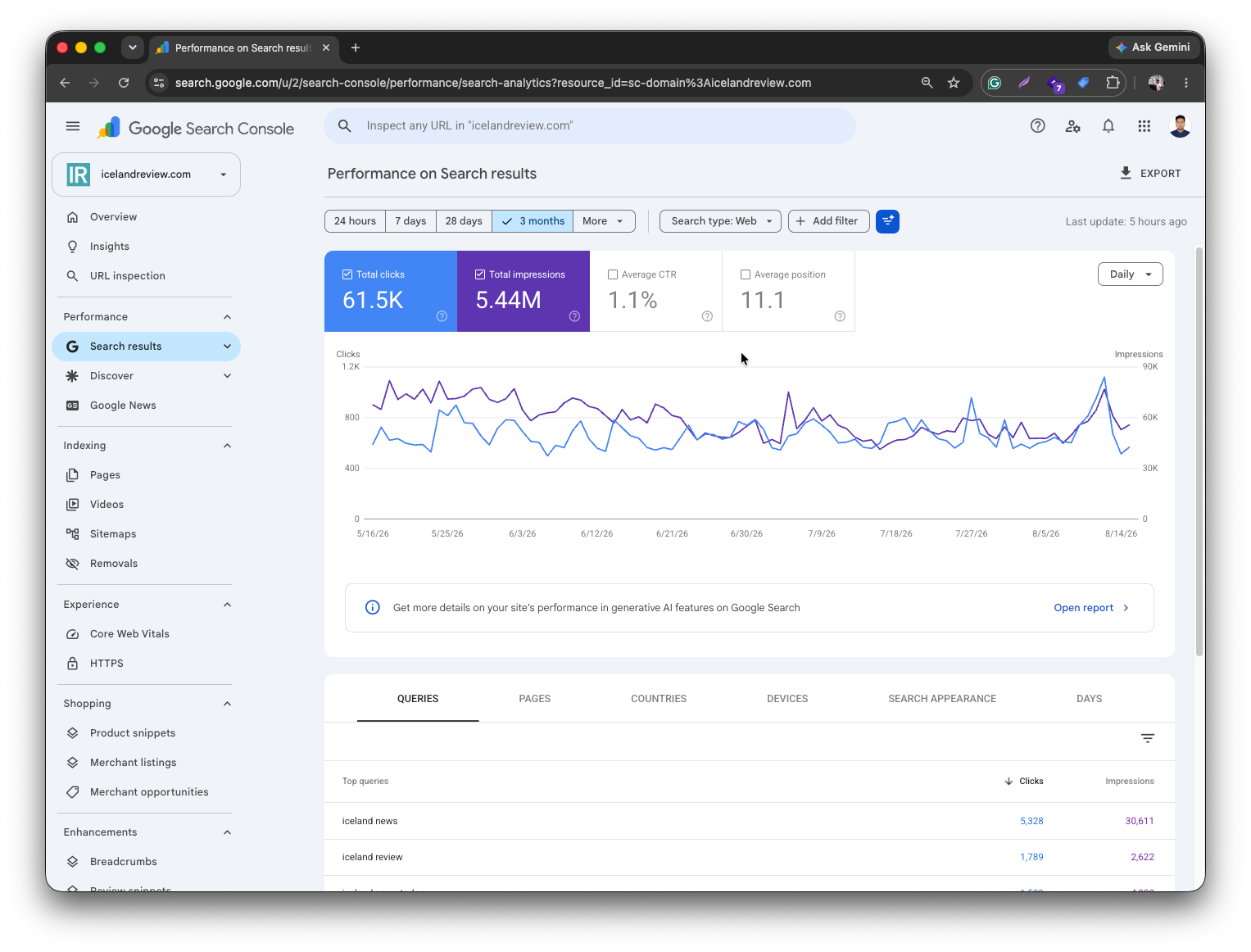
Real Search Console data over the past 3 months: